

.hacktron/config.yaml file to your repository to control Hacktron’s Code Review behavior:
- Exclude specific pull and merge requests so they aren’t scanned.
- Include specific pull and merge requests to be scanned.
- Fail the Hacktron check when a finding meets a severity threshold, so risky changes can’t merge.
.hacktron/rules.md, which shapes the quality of a review. config.yaml controls whether a PR is scanned and whether its check passes.
Configuration hierarchy
Each category (exclude.*, include.*, fail_on.severity) is resolved independently, not the whole file at once:
config.yaml: used if the repo sets this category.- Organization settings: used otherwise.
File location
Place the file at the root of the repository, inside the.hacktron directory:
.hacktron
config.yaml
rules.md
apps
packages
package.json
.hacktron/config.yaml or .hacktron/config.yml is accepted. If both exist, .yaml is used.
Example
config.yaml doesn’t disable filtering; see Configuration hierarchy for how org-wide filters still apply. With no repo or org filters set, Hacktron scans all covered PRs and the check stays green unless the scan itself errors.
Exclude scans
Theexclude block tells Hacktron not to scan a pull or merge request. A match records a skipped check and uses no developer seat.
Hacktron automatically reviews bot-authored changes only when the provider
identifies the bot as trusted for the target repository. Untrusted bots and
outside contributors are not auto-scanned. Eligible bots follow the same
filters and seat rules as other authors. Add a bot’s username to
exclude.authors to skip its future changes.On Bitbucket,
exclude.labels/include.labels are unused, since Bitbucket
pull requests don’t have labels. Author filters
(exclude.authors/include.authors) match on the author’s Bitbucket
nickname, not their display name, so use that when listing authors.exclude.paths excludes a scan only when every changed file matches one
of the patterns. If even one changed file falls outside the patterns, the PR
is scanned as usual. Patterns use the same glob syntax as exclude.branches:
for example vendor/**, **/*.md, or docs/**.Glob pattern syntax
Glob pattern syntax
exclude.branches, exclude.paths, exclude.authors/include.authors, and
include.branches (and their org-wide equivalents) accept glob patterns mixed
with literals. Matching is case-insensitive.For author names,
* and ** usually behave the same because author names do not contain /. The characters [, ], and a leading ! are treated literally. Bracket classes, negation, nested braces, and extended glob forms such as @(a|b) are not supported.The same safety limits apply to repository and organization settings:- Up to 50 entries in each filter category
- Up to 100 characters in each pattern
- Up to five
*characters in each pattern - Up to 10 comma-separated alternatives in one brace expression
Matching nested branches with * vs **
Matching nested branches with * vs **
* matches within one path segment; ** also crosses /.Use
release/* for one-level branches (e.g. release/2.4). Use release/**
to cover any depth. Add a literal segment like release/legacy/** to target
just that subtree.Combine exclude and include to exclude a subtree: include.branches: ["release/**"] with exclude.branches: ["release/legacy/**"] scans all
release branches except release/legacy/**.Include scans
Use the include block to scan only pull and merge requests that match specific rules. Hacktron records a skip check comment on PRs/MRs it doesn’t scan.include.labels: [feature, bugfix] matches either label. Across categories, include requires matching all: include.branches: [main] + include.authors: [alice] only scans Alice’s PRs to main.
exclude and include can target the same category. See glob pattern
syntax for the supported patterns.Fail the check on findings
By default, the Hacktron check is green as long as the scan completes. Findings are posted as inline comments but don’t block the merge. Configure a severity threshold to turn the check red when a finding is at or above that level.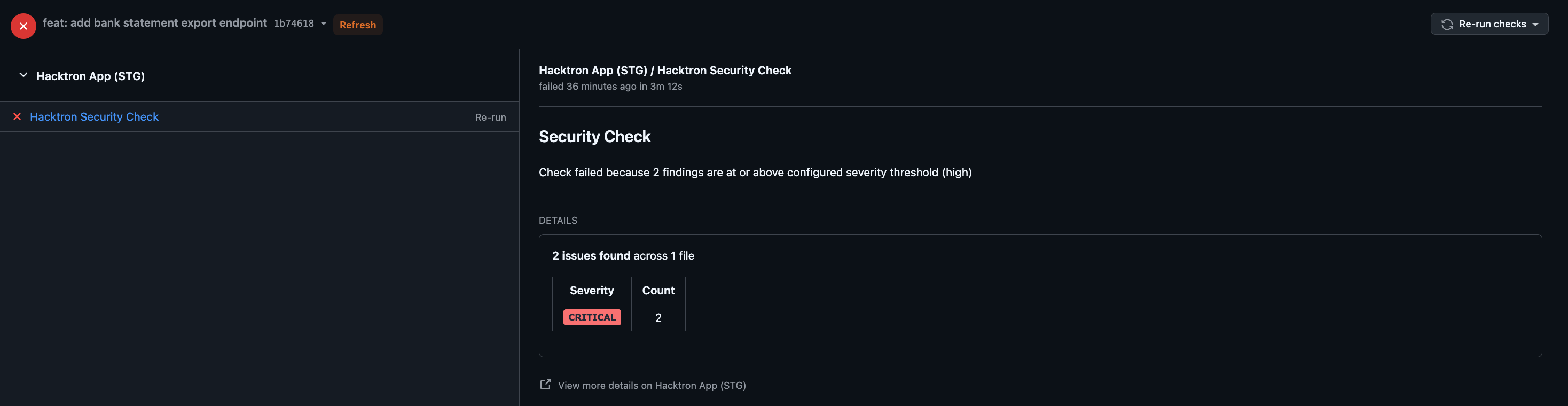
high fails the check on high and critical findings, while critical fails only on critical.
Only open or confirmed valid findings count toward the threshold.
Triaging one recomputes the
check immediately.
config.yaml (see Configuration hierarchy).
- Organization-wide
- Per repository
Set a default for all repositories in your organization from Organization settings.
How invalid config is handled
Hacktron is fail-open about configuration:- A missing, empty, or malformed
config.yamlis ignored. Hacktron scans normally and the check stays green. - Unknown keys are ignored, so a config can carry settings for future features without breaking today’s scans.
- A type mismatch on a known key (for example
fail_on.severity: 7) causes the whole file to be ignored. Keep values in the shapes shown above.
FAQ
My org requires a label to scan PRs, can one repo exclude that rule?
My org requires a label to scan PRs, can one repo exclude that rule?
Org default:
include.labels: [security-review] (only PRs labelled
security-review get scanned).A repo can set its own include.labels: [needs-review] in config.yaml
to require a different label instead, or set include.labels: [] to
remove the requirement entirely and scan PRs regardless of label. Either
way, the repo’s setting replaces the org rule rather than merging
with it.Can a repo use a different fail-check threshold than the org?
Can a repo use a different fail-check threshold than the org?
Org default:
fail_on.severity: critical.A repo handling payment code wants to fail on more than just critical
findings, so it sets fail_on.severity: high in config.yaml. That
repo’s check now turns red on high or critical findings; every other
repo keeps using critical.If a repo only sets one filter, does it lose the rest of the org's filters?
If a repo only sets one filter, does it lose the rest of the org's filters?
No, each filter category (
exclude.branches, exclude.labels, include.branches, and so on) is inherited independently.Org default: exclude.labels: [wip]. A repo adds exclude.branches: [release/legacy/**] but doesn’t set exclude.labels. That repo now excludes
legacy release branches and still excludes wip-labelled PRs. The org’s
label rule keeps applying because the repo never overrode it.Related
Project rules
Add
.hacktron/rules.md to give reviews repository-specific context.Setup
Connect a Git provider, enable repositories, and choose covered branches.