> ## Documentation Index
> Fetch the complete documentation index at: https://docs.hacktron.ai/llms.txt
> Use this file to discover all available pages before exploring further.
# Automation credits
> Understand how you buy automation credit, how each run deducts them, and how auto top-up keeps your balance stocked.
[Automations](/platform/automations/overview) run on shared organization automation credits. Every [remediation](/platform/automations/remediation) run, whether triggered manually from a finding or by an automation, deducts credits based on what the run costs when it completes.
Automation credits are organization-wide. They are separate from Code Review seats and your Whitebox Scan credits.
## How credits work
All organizations with an active [Code Review](/code-review/overview) subscription start with \$50 in automation credits.
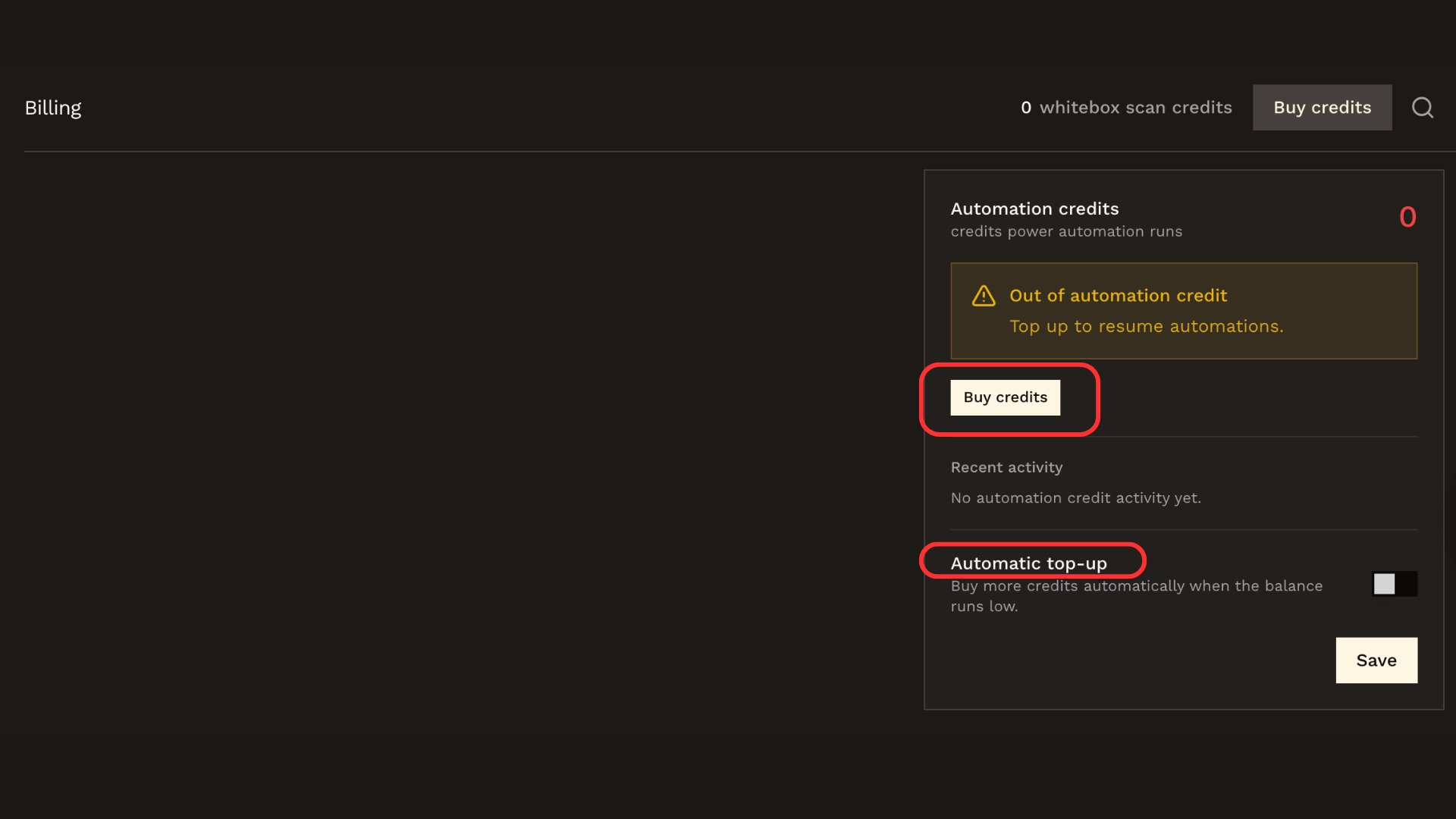
Buy credits from **Billing** (access only for Organization Owners), and / or turn on [auto top-up](#auto-top-up) to keep the balance above a threshold you set.
 Complete any required card authentication (such as 3D Secure). The purchased credits are added to the organization balance after the charge succeeds.
A remediation run only starts while the organization has credits. When the balance runs out, new runs don't start and the Billing page shows that automations are paused.
Each run's cost is deducted from the balance once, when the run completes. Costs vary with the size of the run.
## Auto top-up
Auto top-up buys credits automatically when the balance drops below a threshold, so your automations keep running without manual purchases.
Set it up on the Billing page under your automation credit balance:
* **Trigger**: the balance that starts a top-up.
* **Target**: the balance the top-up buys back up to. Your target must be above the trigger.
* **Monthly limit**: an optional cap on how many credits auto top-up may buy per month.
Auto top-up requires a saved payment method and charges the card on file without an interactive checkout. If a top-up charge fails, your automations stay paused until the balance is topped up manually or the card issue is resolved.
## Related docs
Trigger an AI-generated fix for a finding.
Auto-remediate qualifying findings and notify your team.
Complete any required card authentication (such as 3D Secure). The purchased credits are added to the organization balance after the charge succeeds.
A remediation run only starts while the organization has credits. When the balance runs out, new runs don't start and the Billing page shows that automations are paused.
Each run's cost is deducted from the balance once, when the run completes. Costs vary with the size of the run.
## Auto top-up
Auto top-up buys credits automatically when the balance drops below a threshold, so your automations keep running without manual purchases.
Set it up on the Billing page under your automation credit balance:
* **Trigger**: the balance that starts a top-up.
* **Target**: the balance the top-up buys back up to. Your target must be above the trigger.
* **Monthly limit**: an optional cap on how many credits auto top-up may buy per month.
Auto top-up requires a saved payment method and charges the card on file without an interactive checkout. If a top-up charge fails, your automations stay paused until the balance is topped up manually or the card issue is resolved.
## Related docs
Trigger an AI-generated fix for a finding.
Auto-remediate qualifying findings and notify your team.