> ## Documentation Index
> Fetch the complete documentation index at: https://docs.hacktron.ai/llms.txt
> Use this file to discover all available pages before exploring further.
# Repository configuration
> Use .hacktron/config.yaml to control which pull and merge requests Hacktron scans, and when a finding should fail the check.
Add a `.hacktron/config.yaml` file to your repository to control Hacktron's Code Review behavior:
* **Exclude** specific pull and merge requests so they aren't scanned.
* **Include** specific pull and merge requests to be scanned.
* **Fail** the Hacktron check when a finding meets a severity threshold, so risky changes can't merge.
This is separate from [`.hacktron/rules.md`](/code-review/rules), which shapes the *quality* of a review. `config.yaml` controls *whether* a PR is scanned and *whether* its check passes.
Want to override these rules for a single PR? Comment `@hacktronai review` to
force a scan.
## Configuration hierarchy
Each category (`exclude.*`, `include.*`, `fail_on.severity`) is resolved independently, not the whole file at once:
1. **`config.yaml`** — used if the repo sets this category.
2. **[Organization settings](/platform/organization-settings#scan-filters)** — used otherwise.
See the [FAQ](#faq) for worked examples of how repo and org settings combine.
## File location
Place the file at the root of the repository, inside the `.hacktron` directory:
Either `.hacktron/config.yaml` or `.hacktron/config.yml` is accepted. If both exist, `.yaml` is used.
Hacktron always reads `config.yaml` from your repository's **default branch**
(for example `main`), never from the pull or merge request being scanned. A PR
cannot change its own scanning rules. Commit `config.yaml` to your default
branch for it to take effect.
## Example
```yaml theme={null}
# .hacktron/config.yaml
# Exclude a PR/MR from being scanned when any rule below matches.
exclude:
labels:
- hacktron-exclude
keywords:
- "[exclude hacktron]"
paths:
- "vendor/**"
- "**/*.md"
authors:
- dependabot[bot]
# Fail the Hacktron check when a finding is at or above this severity.
fail_on:
severity: high
```
Every key is optional. An empty or absent `config.yaml` doesn't disable filtering; see [Configuration hierarchy](#configuration-hierarchy) for how org-wide filters still apply. With no repo or org filters set, Hacktron scans all covered PRs and the check stays green unless the scan itself errors.
## Exclude scans
The `exclude` block tells Hacktron not to scan a pull or merge request. A match records a **skipped** check with a comment naming the rule, and uses no developer seat.
Rules are evaluated in this order, first match applies:
| Key | Matches when | Match style |
| ------------------- | ---------------------------------------------------------------------------------------------- | ---------------------------- |
| `exclude.branches` | the PR/MR targets one of these branches | case-insensitive glob |
| `exclude.labels` | the PR/MR carries one of these labels | case-insensitive exact match |
| `exclude.keywords` | the PR/MR **title** contains one of these strings | case-insensitive substring |
| `exclude.paths` | **every** changed file matches one of these patterns | case-insensitive glob |
| `exclude.authors` | the PR/MR was opened by one of these usernames | case-insensitive exact match |
| any key set to `[]` | clears the org-wide default for that key ([Configuration hierarchy](#configuration-hierarchy)) | - |
On Bitbucket, `exclude.labels`/`include.labels` are unused, since Bitbucket
pull requests don't have labels. Author filters
(`exclude.authors`/`include.authors`) match on the author's Bitbucket
nickname, not their display name, so use that when listing authors.
```yaml theme={null}
exclude:
branches:
- "release/legacy/**" # exclude PRs targeting a legacy release branch
labels:
- hacktron-exclude # label the PR "hacktron-exclude" to exclude it
keywords:
- "[exclude hacktron]" # put this anywhere in the PR/MR title to exclude it
paths:
- "docs/**" # exclude when the PR only touches these paths
- "**/*.md"
authors:
- "dependabot[bot]" # exclude all PRs opened by dependabot
```
`exclude.paths` excludes a scan **only when every changed file matches** one
of the patterns. If even one changed file falls outside the patterns, the PR
is scanned as usual. Patterns use the same glob syntax as `exclude.branches` —
for example `vendor/**`, `**/*.md`, or `docs/**`.
`exclude.branches`, `exclude.paths`, and `include.branches` (and their
org-wide equivalents) accept glob patterns mixed with literals: `*`, `**`,
`?`, and `{(a, b)}` brace expansion. Matching is case-insensitive. `[`, `]`,
and a leading `!` are literal, not special syntax. Each category allows up to
50 entries.
`*` matches within one path segment; `**` also crosses `/`.
| Pattern | Matches | Doesn't match |
| ------------------- | --------------------------------------------- | ----------------- |
| `release/*` | `release/foo` | `release/foo/bar` |
| `release/**` | `release/foo`, `release/foo/bar` | — |
| `release/legacy/**` | `release/legacy/1`, `release/legacy/1/hotfix` | `release/other/1` |
Use `release/*` for one-level branches (e.g. `release/2.4`). Use `release/**`
to cover any depth. Add a literal segment like `release/legacy/**` to target
just that subtree.
Combine `exclude` and `include` to exclude a subtree: `include.branches: ["release/**"]` with `exclude.branches: ["release/legacy/**"]` scans all
release branches except `release/legacy/**`.
## Include scans
Use the include block to scan **only** pull and merge requests that match specific rules. Hacktron records a skip check comment on PRs/MRs it doesn't scan.
```yaml theme={null}
include:
branches:
- "main"
- "release/**" # only scan PRs targeting main or a release branch
labels:
- security-review # only scan PRs labelled "security-review"
authors:
- alice # ...and were opened by Alice or Bob
- bob
keywords:
- "please review" # ...and title contains "please review"
```
| Key | Matches when |
| ------------------- | ---------------------------------------------------------------------------------------------- |
| `include.branches` | the PR/MR targets one of these branches (case-insensitive glob) |
| `include.labels` | the PR/MR carries at least one of these labels (case-insensitive exact match) |
| `include.authors` | the PR/MR was opened by one of these usernames (case-insensitive exact match) |
| `include.keywords` | the PR/MR title contains one of these strings (case-insensitive substring) |
| any key set to `[]` | clears the org-wide default for that key ([Configuration hierarchy](#configuration-hierarchy)) |
`include.labels: [feature, bugfix]` matches either label. Across categories, `include` requires matching all: `include.branches: [main]` + `include.authors: [alice]` only scans Alice's PRs to `main`.
`exclude` and `include` can target the same category. See [glob
matching](/code-review/config#matching-nested-branches-with-vs) for pattern
syntax.
## Fail the check on findings
By default, the Hacktron check is green as long as the scan completes. Findings are posted as inline comments but don't block the merge. Configure a severity threshold to turn the check **red** when a finding is at or above that level.
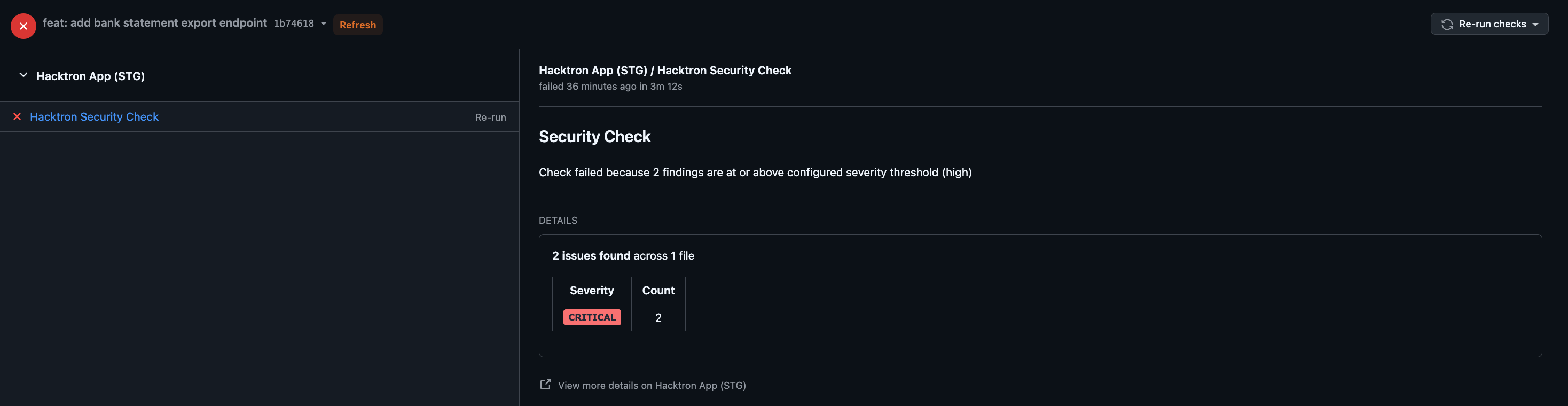 The threshold is **inclusive**: `high` fails the check on `high` *and* `critical` findings, while `critical` fails only on `critical`.
Only **open or confirmed valid** findings count toward the threshold.
[Triaging](/code-review/findings-feedback#triage-comments) one recomputes the
check immediately.
You can set the threshold org-wide from the settings page, or per repository in `config.yaml` (see [Configuration hierarchy](#configuration-hierarchy)).
Set a default for all repositories in your organization from [Organization settings](/platform/organization-settings#check-gate).
Add a `fail_on` block to `.hacktron/config.yaml` to set or override the threshold for a specific repository:
```yaml theme={null}
fail_on:
severity: high # fail the check on any high or critical finding
```
`severity` must be one of, from most to least severe:
`critical` › `high` › `medium` › `low` › `info`
## How invalid config is handled
Hacktron is **fail-open** about configuration:
* A missing, empty, or malformed `config.yaml` is ignored. Hacktron scans normally and the check stays green.
* Unknown keys are ignored, so a config can carry settings for future features without breaking today's scans.
* A type mismatch on a known key (for example `fail_on.severity: 7`) causes the **whole file** to be ignored. Keep values in the shapes shown above.
## FAQ
Org default: `include.labels: [security-review]` (only PRs labelled
`security-review` get scanned).
A repo can set its own `include.labels: [needs-review]` in `config.yaml`
to require a different label instead, or set `include.labels: []` to
remove the requirement entirely and scan PRs regardless of label. Either
way, the repo's setting **replaces** the org rule rather than merging
with it.
Org default: `fail_on.severity: critical`.
A repo handling payment code wants to fail on more than just critical
findings, so it sets `fail_on.severity: high` in `config.yaml`. That
repo's check now turns red on `high` or `critical` findings; every other
repo keeps using `critical`.
No, each filter category (`exclude.branches`, `exclude.labels`, `include.branches`, and so on) is inherited independently.
Org default: `exclude.labels: [wip]`. A repo adds `exclude.branches: [release/legacy/**]` but doesn't set `exclude.labels`. That repo now excludes
legacy release branches **and** still excludes `wip`-labelled PRs. The org's
label rule keeps applying because the repo never overrode it.
## Related
Add `.hacktron/rules.md` to give reviews repository-specific context.
Connect a Git provider, enable repositories, and choose covered branches.
The threshold is **inclusive**: `high` fails the check on `high` *and* `critical` findings, while `critical` fails only on `critical`.
Only **open or confirmed valid** findings count toward the threshold.
[Triaging](/code-review/findings-feedback#triage-comments) one recomputes the
check immediately.
You can set the threshold org-wide from the settings page, or per repository in `config.yaml` (see [Configuration hierarchy](#configuration-hierarchy)).
Set a default for all repositories in your organization from [Organization settings](/platform/organization-settings#check-gate).
Add a `fail_on` block to `.hacktron/config.yaml` to set or override the threshold for a specific repository:
```yaml theme={null}
fail_on:
severity: high # fail the check on any high or critical finding
```
`severity` must be one of, from most to least severe:
`critical` › `high` › `medium` › `low` › `info`
## How invalid config is handled
Hacktron is **fail-open** about configuration:
* A missing, empty, or malformed `config.yaml` is ignored. Hacktron scans normally and the check stays green.
* Unknown keys are ignored, so a config can carry settings for future features without breaking today's scans.
* A type mismatch on a known key (for example `fail_on.severity: 7`) causes the **whole file** to be ignored. Keep values in the shapes shown above.
## FAQ
Org default: `include.labels: [security-review]` (only PRs labelled
`security-review` get scanned).
A repo can set its own `include.labels: [needs-review]` in `config.yaml`
to require a different label instead, or set `include.labels: []` to
remove the requirement entirely and scan PRs regardless of label. Either
way, the repo's setting **replaces** the org rule rather than merging
with it.
Org default: `fail_on.severity: critical`.
A repo handling payment code wants to fail on more than just critical
findings, so it sets `fail_on.severity: high` in `config.yaml`. That
repo's check now turns red on `high` or `critical` findings; every other
repo keeps using `critical`.
No, each filter category (`exclude.branches`, `exclude.labels`, `include.branches`, and so on) is inherited independently.
Org default: `exclude.labels: [wip]`. A repo adds `exclude.branches: [release/legacy/**]` but doesn't set `exclude.labels`. That repo now excludes
legacy release branches **and** still excludes `wip`-labelled PRs. The org's
label rule keeps applying because the repo never overrode it.
## Related
Add `.hacktron/rules.md` to give reviews repository-specific context.
Connect a Git provider, enable repositories, and choose covered branches.